
10 Sep Introducing emu.chat: The New Home for SMS in Microsoft Teams from Edgility
We have some news we’ve been itching to share. Edgility’s Microsoft Teams integration has been completely replaced by emu.chat – a brand-new product, built from the ground up by the Edgility team, for businesses that want to text their customers from inside Microsoft Teams.
This isn’t an update or a rebrand. It’s a new product with a new name, and it’s the biggest thing we’ve shipped in a long time. If you’re looking for an SMS solution for Microsoft Teams anywhere on the Edgility website, you’ll now be pointed to emu.chat – and we think you’ll be very glad you were.
Why we started again
Our legacy Teams integration did its job, and plenty of you used it every day. But over the years, the requests kept coming in, and they were remarkably consistent. You wanted your whole team to be able to see and answer customer texts, not just one person. You wanted to know who was handling what. You wanted your Microsoft 365 contacts and staff list to just be there, without maintaining a separate list. You wanted the important messages to stand out from the routine ones.
The honest answer was that the legacy integration was never designed to do those things well. So rather than keep patching it, we built the product you were describing.
emu.chat has every feature our clients asked for on the legacy Edgility Teams integration – and a whole lot more besides.
What emu.chat does
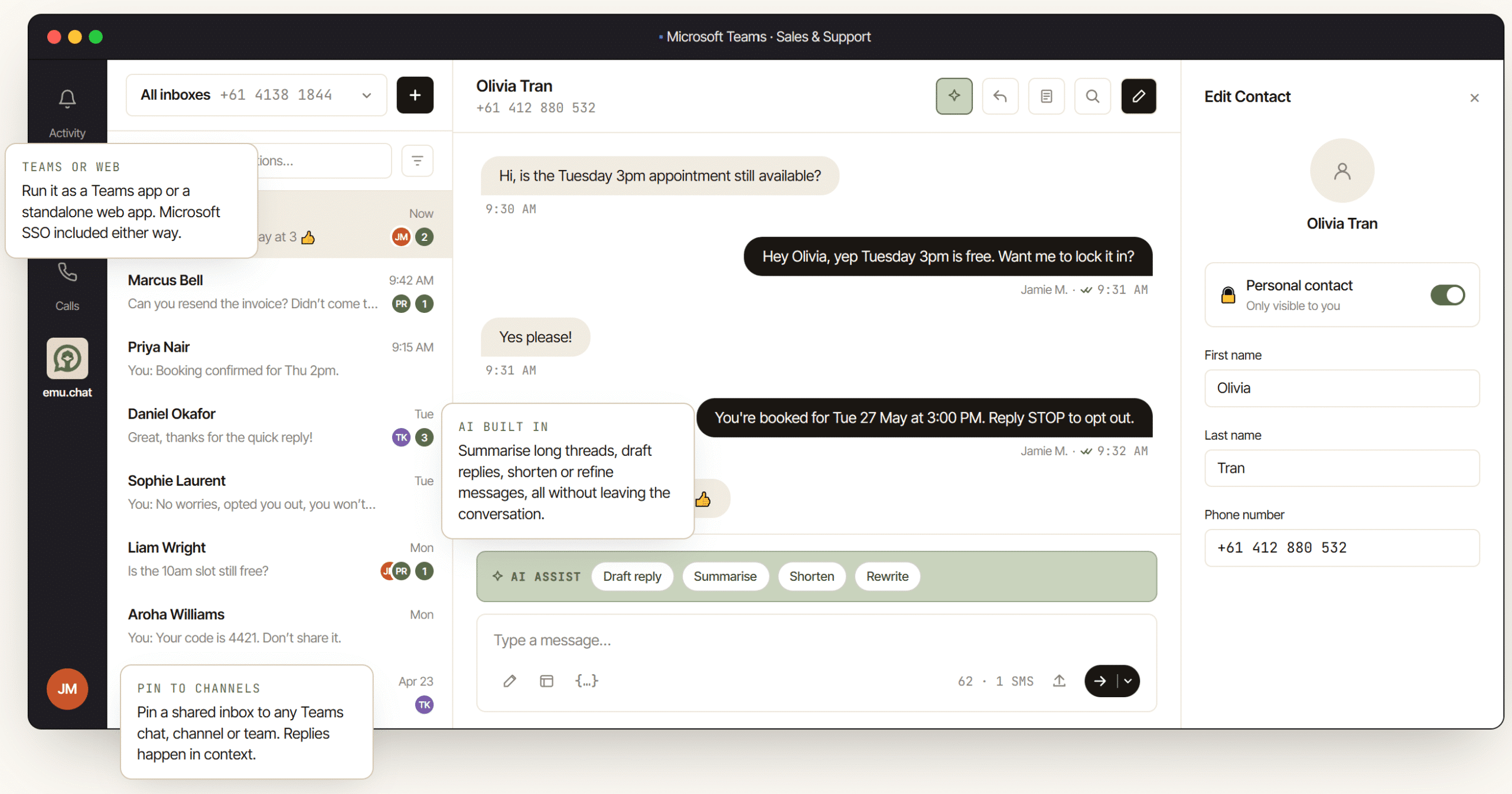
emu.chat plugs SMS and MMS straight into Microsoft Teams, so your sales, support and operations teams can text customers from the same place they already chat with each other. It also runs as a standalone web app on the same data, so you don’t even need Teams to use it.
Here’s what it brings to the table.
Shared inboxes, pinned to your channels
Give your business a shared SMS number, then pin its inbox to the Teams chat, channel or team that owns it. Bookings land in your Bookings channel. Invoice queries land in Accounts. Everyone with access can see the conversation, so nobody has to ask “did anyone get back to them?” Prefer individual inboxes per user? You can do that too.
Assignment and clean handoff
When a customer replies, someone claims the conversation, adds internal notes the customer never sees, and archives it when it’s done. If they go on leave or change roles, they hand it off — and the full history stays with the conversation, not with one person’s phone.
Urgency detection
This is the one our test group couldn’t stop talking about. AI reads every inbound message and flags the ones that are urgent or important. Flagged threads jump to the top of the inbox, get highlighted, and the assigned user is alerted – so a “site is down, need someone now” never gets buried under routine traffic. Assignment can be handled by AI or set manually.
AI built into every conversation
Summarise a long thread in one click. Draft a reply from the conversation history. Shorten, refine or rewrite it with a custom instruction – all without leaving the thread.
Directory sync from Microsoft 365
emu.chat pulls every staff member from Azure AD / Entra ID, plus your Outlook and Teams contacts, so names, mobiles and companies are already there before anyone starts typing. It stays in sync automatically, and your contacts are managed from one central place.
Microsoft SSO, included
Your team signs in with the Microsoft 365 account they already have. No new passwords, no separate accounts for IT to manage.
Templates, macros and scheduling
Save your common replies as templates, drop in customer fields automatically, and schedule sends for later. Appointment reminders and confirmations go out in two keystrokes.
Reminders and native Teams notifications
Set reminders on conversations so follow-ups don’t slip, and get notified right inside Teams when something needs your attention.
SMS and MMS today, RCS soon
Send to any Australian mobile, or internationally at carrier cost. MMS supports attachments up to 2MB. RCS for Business will switch on for every customer the moment Telstra and Optus are ready.
The same Edgility network underneath
While the product is new, the infrastructure isn’t. emu.chat runs on the same Australian messaging network Edgility has been operating for years: direct connections into Telstra, Optus and TPG, an ACMA-certified telco licence, automated opt-out handling, and a full audit log for every number and every send.
Your customer data is stored in AWS Sydney and never leaves the country. Support comes from Sydney-based humans on a real phone number. And there are no setup fees and no long contracts. Built in Australia. Ready to use anywhere.
Important: emu.chat is a separate registration
This is the part we want to be really clear about, because it’s different from how the legacy integration worked.
emu.chat is a separate platform with its own registration. Your Edgility login won’t work on emu.chat, and signing up on the Edgility website won’t give you access to it. Anyone who wants to trial emu.chat – including existing Edgility customers – needs to register directly at emu.chat.
The good news is that registering takes a couple of minutes, the 14-day trial is free, and you don’t need a credit card. You’ll get 25 SMS credits and a virtual Australian number to test with your team straight away.
If you’re currently using the legacy Edgility Teams integration and want a hand moving across, get in touch with us and we’ll walk you through it.
Pricing
emu.chat has one simple launch plan with everything unlocked: $10 AUD per user per month (ex GST, minimum three users). That includes 100 pooled SMS per user, a virtual Australian number for every three seats, the Teams integration and the standalone web app, all AI features, and Microsoft SSO. Monthly billing, cancel anytime.
Sending tens of thousands of messages a month, or running multiple brands? There’s an enterprise option with volume pricing, SAML SSO and SCIM provisioning, custom data residency and a dedicated Australian customer success manager. Just talk to the emu.chat team.
Getting started
You can be up and running in an afternoon:
- Register at emu.chat. Start your free 14-day trial at emu.chat — not on the Edgility website.
- Sign in with Microsoft. Use the 365 account your team already has.
- Add the Teams app. Install emu.chat in Microsoft Teams and sync your directory from Azure AD / Entra ID. Or skip Teams and use the web app.
- Pin your inboxes. Pin a shared inbox to the chat, channel or team that owns it, and start texting customers from where you already work.
We’re incredibly proud of what the team has built, and even more excited to see what you do with it.
Start your 14-day free trial at emu.chat →
See the full feature and pricing breakdown →
Frequently asked questions
I’m an existing Edgility customer. Can I use my Edgility login for emu.chat?
No. emu.chat is a separate platform with its own accounts. Every business — including existing Edgility customers — registers directly at emu.chat to start a trial. Your Edgility account and your emu.chat account are managed separately.
What happened to the Edgility Microsoft Teams integration?
It has been fully replaced by emu.chat. emu.chat includes everything our clients asked for on the legacy integration, plus shared inboxes, assignment and handoff, AI assistance, urgency detection, directory sync and more. Anyone looking for a Teams SMS solution on the Edgility website is now directed to emu.chat.
Do I need a Microsoft Teams licence?
No. emu.chat runs as both a Teams app and a standalone web app, so use whichever suits your team. Microsoft SSO comes with both.
Can we keep our existing business number?
Yes, as long as it’s an Australian mobile. Port your existing 04xx numbers across, or grab fresh Australian virtual numbers in any state.
What about the Spam Act and unsubscribes?
Handled automatically. emu.chat is run by an ACMA-certified Australian telco. STOP and UNSUBSCRIBE are honoured automatically, and every number and every send has a full audit log.
Where is our data stored?
In Australia. Customer data sits in AWS Sydney (ap-southeast-2) and never leaves the country.